Building PicoWeather Watch: From Embedded C to Cloud Monitoring with TinyGo
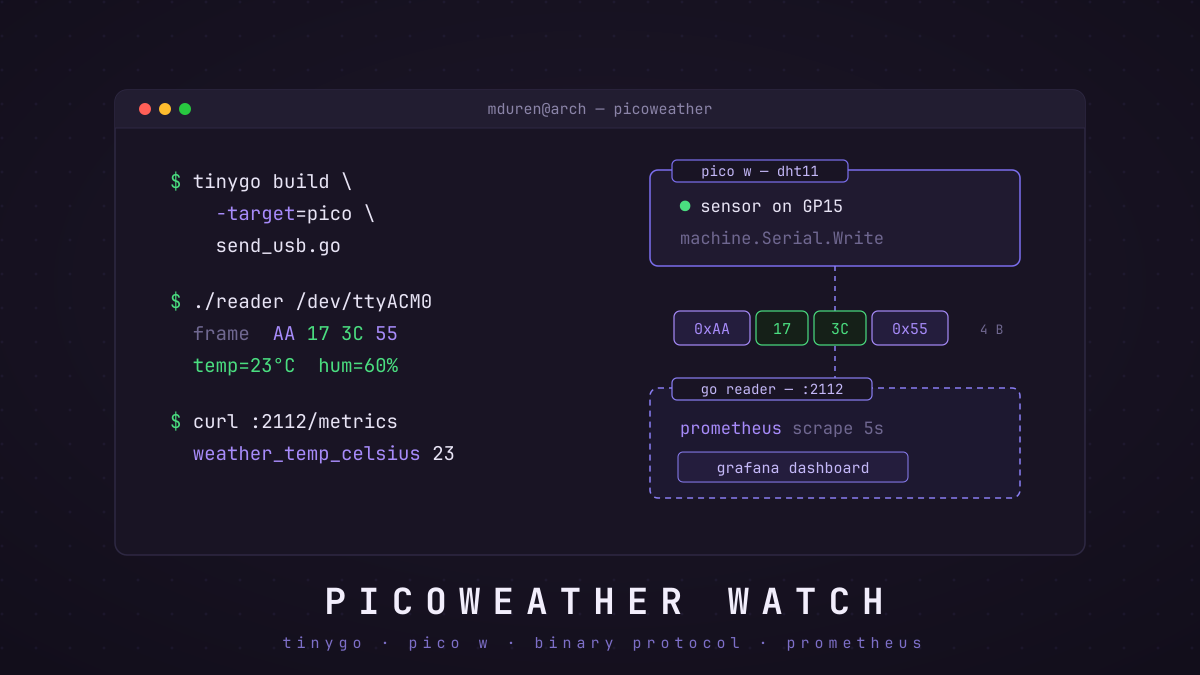
Ever wondered how to bridge the gap between embedded systems and modern cloud monitoring? In this post, I’ll walk you through building PicoWeather Watch—a super simple IoT weather monitoring system that reads temperature and humidity from a Raspberry Pi Pico and DHT sensor and visualizes the data in Grafana.
This project showcases the full stack: embedded C firmware, converting that firmware using Tiny Go, Go services, binary protocol design, and Prometheus metrics. I did not use docker for this because I would have to expose the USB serial device to the container, which can be tricky and is not portable across different host operating systems. Instead, I run the Go reader service directly on the host machine, which allows it to access the USB serial device without any special configuration.
Tiny Go
NOTE: To get tiny go editor support you need to install an appropriate plugin. For neovim I use
pcolladosoto/tinygo.nvim.
Lets start with taking a look at the demo.
What you’ll notice right away is that the code uses a pkg called machine which provides a hardware abstraction layer for different microcontrollers.
This allows you to write Go code that can run on various platforms without modification.
The micro controller target is specified at compile time using the -target flag. For example, to compile for the Raspberry Pi Pico W, you would use:
tinygo build -o firmware.bin -target=pico send_usb.goTo get an idea of the boards supported we can look at their constants here.
I highly recommend going through the Compiler Internals, they’re pretty sumarized but here’s a general overview:
-
Tiny Go uses LLVM as its backend, which allows it to generate efficient machine code for various architectures.
-
It abstracts away interrupts you shouldn’t need to worry about, most of this is implemented on a per board basis.
-
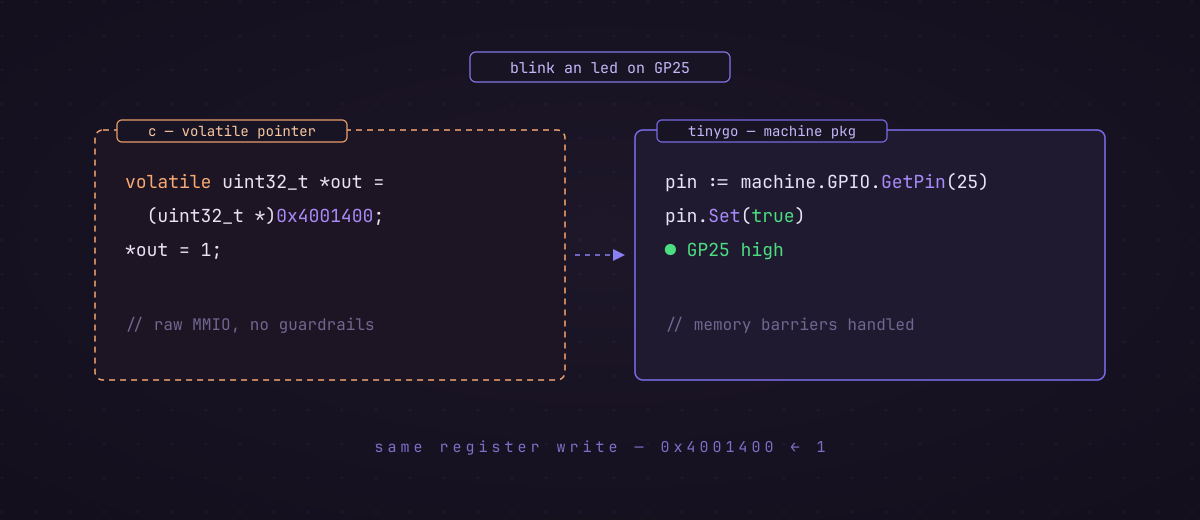
Rather than using volatile variables for hardware registers tiny go gives us
GetandSetmethods on thePintype, which handle the necessary memory barriers and ensure safe access to hardware registers.Example:
volatile uint32_t *gpio_out = (volatile uint32_t *)0x4001400;
*gpio_out = 1;
becomes
pin := machine.GPIO.GetPin(25) // Get pin 25 (onboard LED) pin.Set(true) // Set pin high -
If you’re feeling like a nut you can even write assembly:
result := arm.AsmFull(`
    add {}, {value}, #3
`, map[string]interface{}{
    "value": 42,
})
println("result:", int(result))
I’d never do this, but hey it’s there if you need it!
- Tiny go tries not to use heap allocs, and you should too! Be wary of esacpe analaysis, taking pointers, you can be aware that this is not the time for unecessary abstractions, or any really. Tiny go already gave you some be grateful!
-
Go routines are supported, similar to the normal go runtime a stack is allocated per routine and switching happens by saving and restoring the CPU registers. If you are going into the world of concurrent embedded programming though you should be careful about memory usage and avoid creating too many goroutines, and if you need highly performant concurrency maybe use the hardware interrupts instead.
-
One last thing about heap allocations, if you’re using a timing based protocol like the DHT11 you should be careful about any GC pauses that could cause you to miss critical timing windows. In general, it’s best to avoid heap allocations in time-sensitive code. You can use slices as long you’re aware of when they may cause a heap allocation.
The Project
The system architecture is simple:
- Raspberry Pi Pico W with DHT sensor reads temperature/humidity
- Firmware (C or Go) sends data via USB serial using a custom binary protocol
- Go Reader Service parses the binary frames and exposes Prometheus metrics
- Prometheus scrapes the metrics every 5 seconds
- Grafana visualizes the data in real-time dashboards
Why Two Firmware Implementations?
I implemented the firmware in both C and Go (using TinyGo) to explore different embedded development approaches. Both use the exact same binary protocol, making them interchangeable
The Binary Protocol: Keeping It Simple
When you’re sending data from a microcontroller over USB SERIAL, every byte counts. I mean, this is a super simple example so it’s not that big of a deal right now, but how does it scale? Anyway, I designed a minimal 4-byte frame format:
{0xAA, temperature, humidity, 0x55}- Byte 0: Start marker (
0xAA) - Byte 1: Temperature in degrees Celsius (0-255)
- Byte 2: Humidity in percent RH (0-100)
- Byte 3: End marker (
0x55)
Bytes 0 and 3
By the way 0xAA and 0x55 are communicationn protocol classics. They are
commonly used as start and end markers because they have distinct bit patterns
(10101010 and 01010101) that help with synchronization and error detection.
Why this design?
- Fixed-length frames are easier to parse than variable-length
- Start/end markers provide frame synchronization even if bytes are lost
- Single-byte values keep it simple (DHT11 only provides integer readings anyway)
- Total of 4 bytes means minimal bandwidth usage
Reading Binary Data: The Frame Parser
The most interesting part of the Go reader service is the frame parser. Here’s how it handles the binary stream:
func (wr *WeatherReader) Start(ctx context.Context) error {
  // Buffer to read raw bytes from the serial port, could be smaller since we only expect 4 bytes at a time
  // but using a larger buffer allows us to read multiple frames at once if they arrive together or handle cases where the USB driver delivers data in chunks of any size
	buffer := make([]byte, 256)
  // Temporary buffer to build frames as we read bytes one at a time
	frameBuffer := make([]byte, 0, FrameSize)

    wr.logger.Info("starting USB reader")

    for {
    	select {
      // Just looping until shutdown signal is received, then we log and exit gracefully
    	case <-ctx.Done():
    		wr.logger.Info("stopping USB reader")
    		return ctx.Err()
    	default:
        // read to the buffer, which may contain 1 or more frames or even partial frames depending on how the USB driver delivers data
    		n, err := wr.Read(buffer)
    		if err != nil {
    			if errors.Is(err, io.EOF) {
    				continue
    			}
    			wr.logger.Error("error reading from serial port", "error", err)
    			time.Sleep(time.Second)
    			continue
    		}

        // loop through the bytes we just read, which could be anywhere from 1 to 256 bytes, and use the frameBuffer to build complete frames
    		for i := range n {
    			b := buffer[i]

    			// Start of frame
    			if b == FrameStart && len(frameBuffer) == 0 {
    				frameBuffer = append(frameBuffer, b)
    				continue
    			}

    			// Building frame
    			if len(frameBuffer) > 0 && len(frameBuffer) < FrameSize {
    				frameBuffer = append(frameBuffer, b)

    				// Complete frame received
    				if len(frameBuffer) == FrameSize {
    					if frameBuffer[3] == FrameEnd {
                // update data being read by prometheus
    						wr.processFrame(frameBuffer)
    					} else {
    						wr.logger.Warn("invalid frame end marker", "frame", frameBuffer)
    					}
              // reset frame buffer for next frame
    					frameBuffer = frameBuffer[:0]
    				}
    			}
    		}
    	}
    }

}
How the Parser Works
The parser uses a state machine approach:
- Wait for START marker (
0xAA): Ignore all bytes until we see the start marker - Collect 4 bytes: Once we have a start marker, collect the next 3 bytes
- Verify END marker (
0x55): Check if byte 4 is the end marker - Process or discard: If valid, process the frame; otherwise, reset and wait for the next start marker
This approach handles several edge cases:
- Partial frames: If we only receive 2 bytes before the stream stops, we’ll timeout and reset
- Noise: Random bytes before the start marker are safely ignored
- Desync: If we get corrupted data, the end marker check catches it
Binary Parsing Gotcha
Always use a buffer and never assume bytes arrive together! USB serial can deliver data in chunks of any size. The parser must handle receiving bytes one at a time or all four at once.
The C Firmware: Talking to DHT11
The C implementation uses the Pico SDK to read from the DHT11 sensor and send data over USB:
int main() {
    init();

    while (1) {
        dht11_reading reading;
        int rc = read_from_dht11(&reading);

        if (rc == SUCCESS) {
            uint8_t packet[4] = {
                0xAA,
                (uint8_t)reading.temperature,
                (uint8_t)reading.humidity,
                0x55
            };
            stdio_put_string((char *)packet, 4, 0, 0);
        }

        sleep_ms(2000);
    }
}
The Go Firmware: TinyGo Magic
The Go version uses TinyGo—a Go compiler for embedded systems. Here’s the equivalent code:
func send(temperature, humidity int32) error {
    tempByte := byte(temperature / 1000) // millidegrees -> degrees
    humByte := byte(humidity / 1000)     // millipercent -> percent

    packet := [4]byte{0xAA, tempByte, humByte, 0x55}
    _, err := machine.Serial.Write(packet[:])
    return err

}
TinyGo vs C
The build size actually ends up being pretty similar. Although these are both small programs and I may not be the best at
cmake files:
-
C:
65K Mar 18 08:11 pico_weather_watch.uf2 -
GO:
66K Mar 18 16:53 output.uf2
Grafana Dashboards: Visualizing the Data
Once Prometheus is scraping the metrics, creating Grafana dashboards is simple. Here are some example queries:
Current Temperature:
weather_temperature_celsiusTemperature Over Last Hour:
weather_temperature_celsius[1h]Humidity Change Rate:
rate(weather_humidity_percent[5m])Pro Tip
Add alerts in Grafana to notify you when temperature goes above/below thresholds. Perfect for monitoring server rooms, greenhouses, or your home office!
Lessons Learned
-
I need to understand the electronics more: After this I have a few books planned on understanding the components like conductors, resistors, capacitors, and how to read circuit diagrams. I also want to learn how to use a multimeter and oscilloscope properly and make a music synthesizer some day.
-
TinyGo is production-ready: For non-critical embedded projects, TinyGo offers a great developer experience with minimal overhead.
-
Structured logging kinda sucks: FOR this, I’d have to do different builds for debugging and go service reading data, since logs break the binary protocol.
-
Observability matters: Even for hobby projects, proper metrics and monitoring make development much smoother, I really should get a debugger for my pico 😝.
What’s Next?
Some ideas for extending this project:
- Bluetooth support: Use the Pico W’s Bluetooth to send data wirelessly
- Multiple sensors: Add more DHT11 sensors and implement a sensor ID in the protocol
- Historical data: Store readings in a time-series database like InfluxDB
- Remote access: Expose the Grafana dashboard securely over the internet
- Power optimization: Use deep sleep modes to run on battery power
Conclusion
Building PicoWeather Watch was a great exercise in full-stack IoT development. From bit-level binary protocols to cloud-native monitoring, the project touches on numerous interesting topics.
The source code is available on GitHub, and I encourage you to build your own version. Whether you choose C or Go for the firmware, you’ll learn a ton about embedded systems, binary protocols, and modern observability practices.
Happy hacking!
Have questions or built something similar? Reach out on GitHub!
github.com/michael-duren